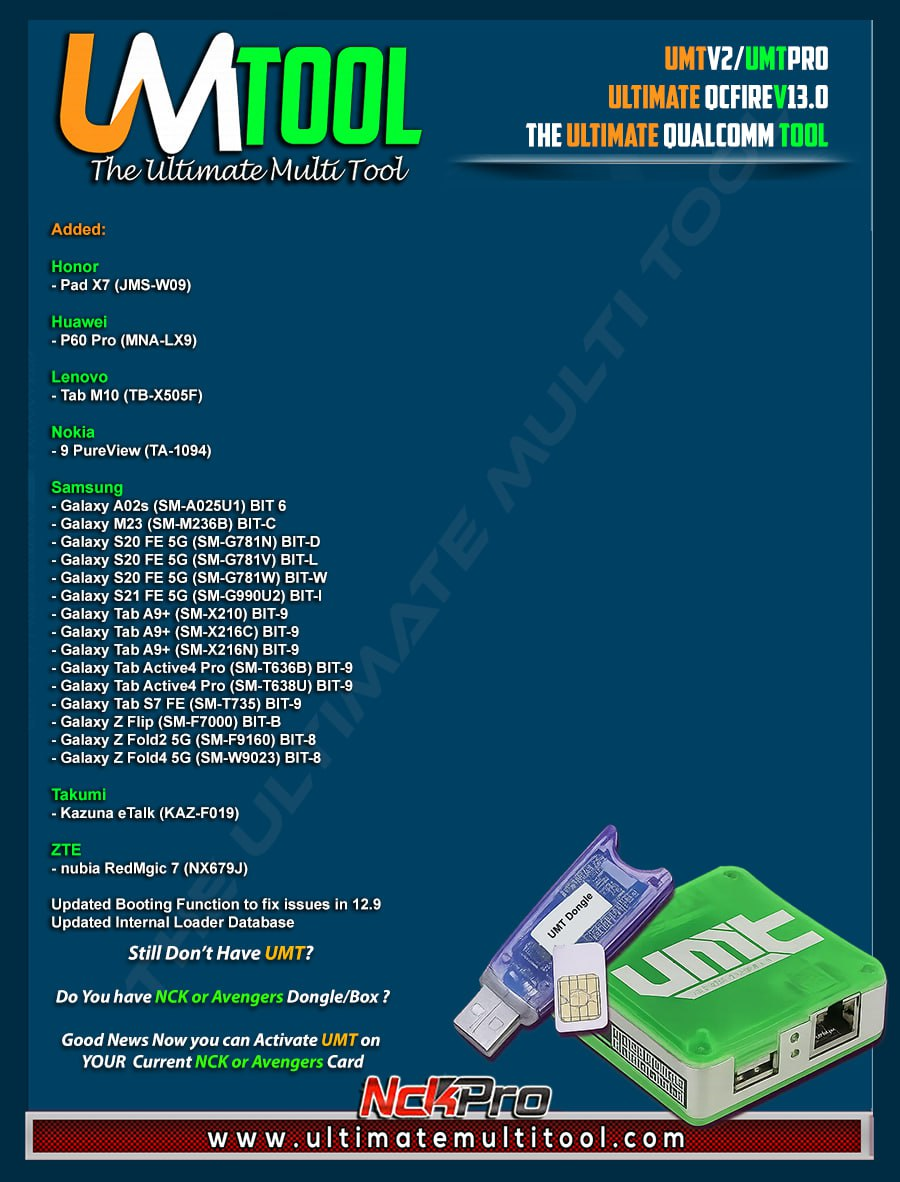
UMT Dongle QcFire latest v13.0 Fast Download link
UMTv2 / UMT Pro QcFire v13.0 Update | UMT Dongle QcFire latest v13.0 Fast Download link
The Ultimate Multi Tool Team is proud to officially announce the release of UMTv2 / UMT Pro QcFire v13.0, the latest and most advanced version of the UMT QcFire Qualcomm tool. This new update delivers a powerful combination of new features, expanded Qualcomm device support, internal optimizations, and critical fixes, making QcFire v13.0 one of the most stable and feature-rich releases so far.
This version is designed for professional mobile technicians, service centers, and advanced users who rely on UMTv2 and UMT Pro dongles for daily Qualcomm servicing operations such as FRP reset, IMEI repair, EFS handling, Mi Account services, Samsung unbrick, and advanced EDL-based functions.
If you are searching for the UMT QcFire latest version download, the official UMT dongle setup link, or a reliable source to update your UMT Pro software, QcFire v13.0 is the recommended update.
You can also renew your UMT Activation License by visiting:
👉 https://gsmmeta.com/shop
🔥 QcFire v13.0 – Supported Functions (Qualcomm Platform)
QcFire v13.0 includes an extensive and professional set of Qualcomm servicing features, covering almost every critical repair and software operation required for modern Android devices.
Core Qualcomm Functions
Read / Write Firmware
Backup & Restore QCN
IMEI Repair (FTM / Diag + Flash Mode)
Backup, Reset & Restore Security (EFS)
Reset FRP (Google Factory Reset Protection)
Format UserData & Factory Reset
Lock, Security & Access Functions
Read Pattern Lock (Android below 6.0, unencrypted devices only)
Reset Locks (PIN, Password, Pattern without data loss on unencrypted devices)
Disable / Restore Locks for Encrypted Userdata
Enable Diag Mode (OEM Unlock required, may not work on BL-locked devices)
Reboot Device to EDL from Fastboot
Xiaomi-Specific Advanced Services
Xiaomi Mi Account Reset & Disable
Xiaomi Factory Reset via Sideload Mode
Xiaomi EDL Locked Device Service
Xiaomi Bootloader Unlock in EDL Mode (supported models)
Xiaomi Free Auth Service (Bypass)
Xiaomi Auth Bypass for newer devices
Mi Account Reset without Relock
Mi Account Patch during Flashing (EDL / Fastboot)
Samsung, Vivo, Oppo & Other OEM Features
Samsung MDM Unlock in EDL Mode
Samsung KG Bypass
Samsung Unbrick & Dead Boot Repair
Samsung TAR-to-Unbrick Firmware Creator
Vivo One-Click Lock Reset (Encrypted Userdata)
Unique Vivo Reset Locks for Protected Devices
Oppo OFP Firmware Extraction
Oppo / Realme / OnePlus VIP Bypass
Additional Advanced Operations
Motorola Boot Repair
One-Click Root in EDL Mode (Generic Qualcomm Devices)
Forensic Functions (Read Contacts & Messages in EDL Mode)
Nokia NB0 Factory Firmware Direct Flashing in EDL Mode
With this massive feature set, UMT QcFire v13.0 stands out as one of the most complete and reliable Qualcomm servicing tools available with the UMT Pro Dongle.
✅ Newly Added Supported Models
Honor
Honor Pad X7 (JMS-W09)
Huawei
Huawei P60 Pro (MNA-LX9)
Lenovo
Lenovo Tab M10 (TB-X505F)
Nokia
Nokia 9 PureView (TA-1094)
Samsung (Qualcomm Based)
Galaxy A02s (SM-A025U1) – BIT 6
Galaxy M23 5G (SM-M236B) – BIT C
Galaxy S20 FE 5G (SM-G781N) – BIT D
Galaxy S20 FE 5G (SM-G781V) – BIT L
Galaxy S20 FE 5G (SM-G781W) – BIT W
Galaxy S21 FE 5G (SM-G990U2) – BIT I
Galaxy Tab A9+ (SM-X210 / X216C / X216N) – BIT 9
Galaxy Tab Active4 Pro (SM-T636B / SM-T638U) – BIT 9
Galaxy Tab S7 FE (SM-T735) – BIT 9
Galaxy Z Flip (SM-F7000) – BIT B
Galaxy Z Fold2 5G (SM-F9160) – BIT 8
Galaxy Z Fold4 5G (SM-W9023) – BIT 8
Takumi
Kazuna eTalk (KAZ-F019)
ZTE
Nubia RedMagic 7 (NX679J)
🛠 Improvements & Fixes in QcFire v13.0
Updated booting function to fix issues reported in v12.9
Updated internal loader database for better device compatibility
Fixed “Forbidden Application Detected” error
Improved Samsung Qualcomm EDL connection handling on newer firmware versions
🔌 Samsung EDL Connection Method (Important Notice)
For newer Samsung Qualcomm devices, users must follow the updated EDL connection procedure available in the tool log.
On recent firmware versions, rapidly pressing VOL UP + VOL DOWN 10–20 times may be required to successfully enter EDL mode.
📥 UMT QcFire v13.0 Download Links | UMT QcFire Latest Version Download (Manual)
MediaFire:
https://www.mediafire.com/file/rrgb9d2b33e8ejw/UMTv2_UMTPro_QcFire_v13.0_Setup.7z/file
Google Drive:
https://drive.google.com/file/d/1lpGSjO4RdxIJg3jb4ubqGs2ubku6Fq_2/view
Official UMT Dongle Setup Link (Recommended)
👉 https://gsmmeta.com/downloads/umt-dongle-setup
On GsmMeta.com, we regularly provide latest GSM tool updates, official downloads, and industry news.
You can also join our WhatsApp News Channel for real-time GSM updates via GsmMeta.com | News – GSM Latest Updates.
If you need to renew your UMT Activation License, visit:
👉 https://www.gsmmeta.com/shop
📌 Important: Use UMT Card Manager to update the card counter, firmware, and activate add-ons through Support Access.
Written by
GsmMeta Admin
Comments (0)
Please sign in to leave a comment
Sign In